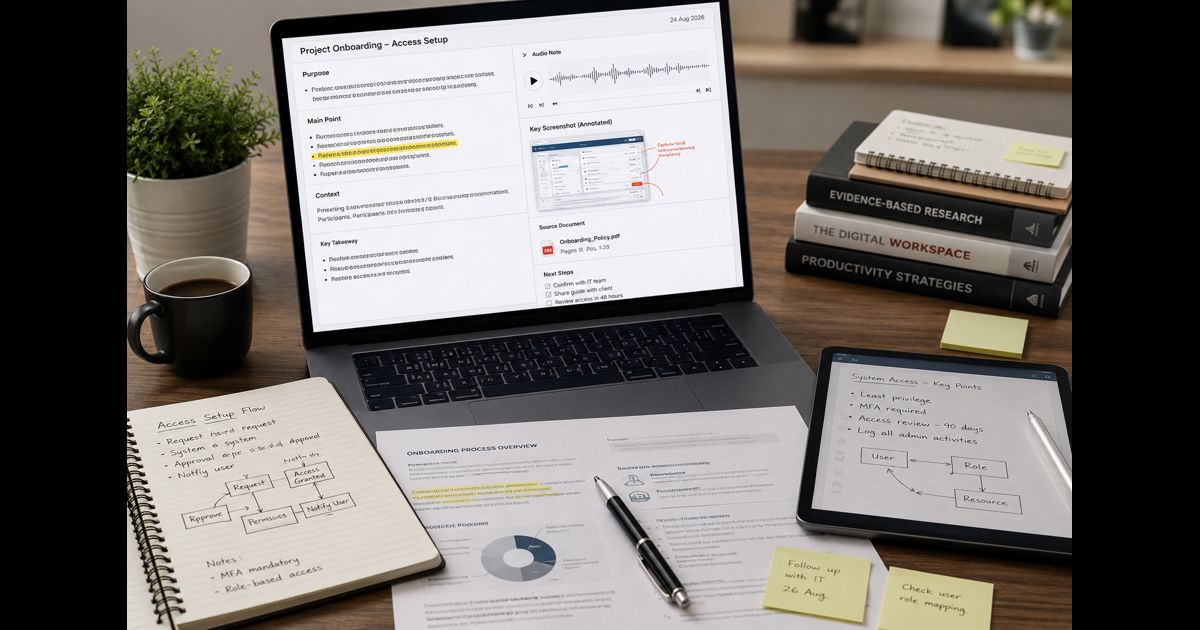
Multimedia notes combine written observations with relevant images, audio, video clips, documents, links, diagrams, or screenshots. Used well, they preserve the context that plain text can lose: the exact slide discussed in a meeting, the moment in a lecture when a concept changed, the image that identifies a field observation, or the source behind a decision.
The wording “multimedia notes multimedia notes Snapjotz com” should not be taken to mean that SnapJotz.com is a verified note-taking app or that it stores users’ private notes. SnapJotz.com is a publishing website. The useful subject is the method itself: building notes in which each piece of media has a clear purpose and remains easy to find, understand, and review.
A multimedia note is more than a file collection
A folder full of recordings, screenshots, and attachments is not automatically a useful note system. A multimedia note connects each item to an idea.
For example, after a product demonstration, an effective entry may include:
- A one-sentence summary of the decision or lesson
- A timestamped link to the relevant part of the recording
- One annotated screenshot showing the feature under discussion
- The owner, next step, and deadline
- A source link or file reference that lets another person verify the context
The written summary is the anchor. Media should clarify, support, or document it. Without that anchor, a large library of clips can become difficult to review and nearly impossible to share responsibly.
Choose media according to the information it preserves
Different formats solve different problems. Adding every format to every note creates clutter, not depth.
|
Format |
Best use |
Useful note beside it |
|
Screenshot or photograph |
Interfaces, whiteboards, physical objects, visual evidence |
Label what matters and why it was captured |
|
Audio clip |
Spoken explanation, pronunciation, interview detail |
Add a timestamp and short summary |
|
Video clip |
Demonstration, process, movement, presentation segment |
Record the key observation and the clip’s purpose |
|
Diagram or sketch |
Relationships, systems, sequence, spatial layout |
Define symbols and state the conclusion |
|
PDF or document excerpt |
Reference material, policy, research, specification |
Cite page or section and explain its relevance |
|
Link |
A stable external source |
Save title, author or publisher, date, and takeaway |
A photograph of a whiteboard, for instance, should not stand alone. Add the meeting date, participants, a transcription of any decisions, and a note about unresolved items. The image then becomes evidence within a usable record.
Capture the minimum that protects meaning
The best time to structure a multimedia note is immediately after capture, while the context is still clear. A simple five-part pattern works across study, work, and research:
- Purpose: Why does this note exist?
- Main point: What should the reader understand or do?
- Media reference: Which image, clip, file, or link supports that point?
- Context: When, where, and from whom did it come?
- Next action: Review, verify, share, decide, or follow up.
This avoids a common problem with recordings: the file may be technically saved but practically unusable because nobody remembers what is inside it.
For live events, write short markers while listening. “14:20—pricing exception explained” is far more useful than replaying a full hour to locate a single point. Afterward, turn only the important markers into complete notes.
Keep visual and written information close together
Multimedia learning research consistently warns against unnecessary material and poorly connected formats. When an image is relevant, place its explanation beside it. When a recording matters, connect the summary to the exact time. When a diagram contains a critical step, label the step directly rather than explaining it far below the visual.
This reduces the effort required to connect related information. It also makes notes easier to revisit after the original event has faded from memory.
Do not use decorative images, background audio, or long video clips simply to make a page feel richer. They compete with the material that needs attention. A short, clearly labelled clip is usually more valuable than an entire recording with no markers.
Build notes for retrieval, not just capture
A note becomes valuable when it can be found at the moment it is needed. Use a consistent naming and tagging pattern:
Project or subject → date → topic → media type → status
For example:
Client onboarding / 2026-08-24 / access setup / annotated screenshot / confirmed
Tags should describe real retrieval needs, such as decision, interview, lecture, source-check, how-to, or follow-up. Avoid building a long tag list that is never used.
A useful review routine is equally important:
- Review new notes within 24 hours and add missing context.
- Replace vague filenames with meaningful titles.
- Mark decisions, questions, and tasks separately.
- Remove duplicate files only after confirming that no unique annotation is lost.
- Check whether external links still work when the material has long-term value.
For evidence-based notes, a consistent research process also matters: distinguish a primary source from commentary, record where an image or quotation came from, and note when a claim still needs verification.
Use transcripts carefully
Transcription can make audio and video searchable, but it is not a substitute for review. Automated transcripts may mishear names, technical language, accents, numbers, or context-dependent statements.
Keep the original file when accuracy matters. Then review and correct the passages that support a decision, report, quotation, or instruction. If a clip contains personal, confidential, medical, legal, financial, or client information, confirm that recording, storage, transcription, and sharing are permitted before uploading it to any service.
The same caution applies to screenshots. They can unintentionally reveal email addresses, account data, location details, private messages, or access credentials. Crop or redact sensitive information before sharing a note.
Make multimedia notes accessible
A note that relies only on sound or visuals excludes readers who cannot access that format easily. Accessibility also improves everyday retrieval.
Add:
- Alt text or a concise description for meaningful images
- Captions or a transcript for audio and video
- High-contrast annotations that do not depend on color alone
- Clear headings for longer notes
- A written summary for diagrams and visual processes
A person should be able to understand the central point without needing to play every recording or inspect every image at full size.
Share a clean version, not the raw workspace
Working notes can be messy. Shared notes should be edited for the recipient.
Before sending a multimedia note, check:
- Does the opening summary state the conclusion?
- Are the media files essential and correctly labelled?
- Can recipients access the links or attachments?
- Are timestamps, dates, and source details clear?
- Has confidential material been removed or permission confirmed?
- Is the requested action unmistakable?
This small review prevents a familiar failure: sharing a large set of files that transfers responsibility for interpretation to the recipient.
Multimedia notes work best when they are selective
A strong multimedia note does not attempt to preserve everything. It preserves the evidence and explanation needed to understand an event, revisit a lesson, or make a sound decision later.
Text provides the structure. Images, audio, video, and documents provide context. Labels, timestamps, source details, and review turn those materials into a dependable record.
Frequently Asked Questions
What are multimedia notes?
Multimedia notes are notes that combine written information with useful media such as images, audio, video, diagrams, documents, or links. Each item should support a specific point rather than sit as an unlabelled attachment.
Are multimedia notes better than text-only notes?
Not always. They are helpful when media preserves information that words alone cannot capture well, such as a demonstration, visual layout, spoken explanation, or original source. For simple facts and quick tasks, text-only notes may be faster and clearer.
How can I make recorded lectures easier to review?
Write short timestamped markers during the lecture, then turn the important ones into brief summaries afterward. Include the topic, the key point, and any question or action that follows.
What should I avoid adding to multimedia notes?
Avoid decorative media, duplicate attachments, unlabelled recordings, sensitive information, and content with no connection to the main point. More media does not automatically make a note more useful.
Can multimedia notes be used for research?
Yes, provided sources are identified clearly and important claims are verified. Save the publisher or author, date, link, relevant page or timestamp, and a short explanation of what the source supports.